
Check out Bite VPN for China for Free!

A single Bite VPN for China account for every device. Bite VPN for China Various plan options: 1-week to 1-year

  • A single Bite VPN for China account for every device.
  • Bite VPN for China Various plan options: 1-week to 1-year
  • Prompt Bite VPN for China customer support
  • Free time every day!
  • 30-day money-back guarantee 
You can obtain the free tier by checking in daily within the app.
Bite VPN for China complimentary trial

有些用户在使用Bite VPN for China时,可能会遇到Windows电脑显示连接成功但无法访问任何外网的情况。
这通常是由于系统中的v9虚拟网卡出现异常导致的,因此我们需要先卸载当前的v9虚拟网卡,
然后在重新安装Bite VPN for China客户端时,新的v9虚拟网卡将会被自动创建,从而确保加速器能够正常工作。

请按照以下步骤进行操作:
1. 打开系统的“设备管理器”,找到“网络适配器”。
2. 在“网络适配器”列表中,卸载所有带有“V9”字样的虚拟网卡(Tap-windows-Adapter V9)。
请确保卸载所有的v9虚拟网卡,即使它们的数量不止一个。
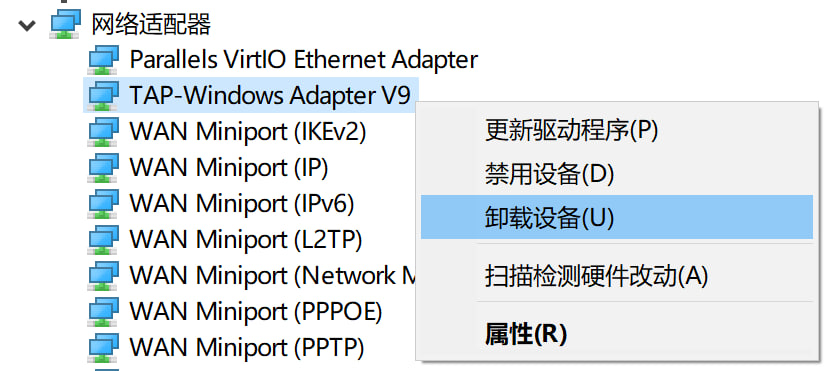
网络适配器2


3. 卸载已经安装的Bite VPN for China客户端。
4. 重启您的计算机。
5. 重启后,重新安装Bite VPN for China并确保连接成功,然后打开浏览器查看是否能够正常访问外网。


附: Bite VPN for China客户端下载链接

Bite VPN for ChinaWin8-11版本下载